Mecha War
by TMKgames
 1
 1
Game Controls
Game Instruction






Mecha War
| Rating |
2 votes |
|---|---|
| Developer | TMKgames |
| Technology | HTML5 |
| Platforms | Browser (desktop, mobile, tablet) |
| Orientation | Landscape |
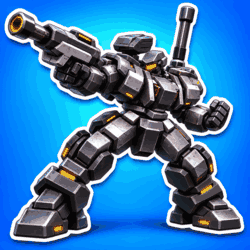
Mecha War is a third-person shooting game where you build your own mech, choose its weapons, and fight AI pilots in duels, team battles, and Battle Royale.
Before heading into battle in Mecha War, you get to decide how to arm your mech. Choose its arm weapons and fit two units on its back, then take that setup into a match to see how it handles. You might find that you enjoy fighting up close and using melee attacks, or that you prefer keeping some distance while lining up your shots. As you try different equipment, you can change your loadout to suit the way you like to fight.
There are several ways to put your mech to the test across six environments. A 1v1 duel gives you a single opponent to focus on, while 2v2 matches add teammates and more targets to watch. The larger 6v6 platoon battles put more mechs into the fight, so you need to pay attention to what’s happening around you as well as the enemy you’re aiming at. Battle Royale gives you another challenge, with loot to collect as you try to survive the fighting.
Moving your mech is just as important as choosing its weapons. You can dash to change position quickly, hold the boost control while moving to cover ground, or charge a jump and take the fight into the air. Hovering gives you another way to move around the battlefield, while melee combos let you attack when an opponent gets close. Try using these moves alongside your weapons so you don’t spend the whole match standing in one place and trading shots.
Battles earn you Credit to spend on new parts and paint schemes. New equipment gives you more combinations to try, while paint lets you change how your mech looks. If a setup doesn’t feel right, swap a part and take it into another match rather than sticking with weapons you don’t enjoy using.
On a computer, move with WASD and aim with the mouse, using the left mouse button to fire and the right mouse button to focus your aim. Shift lets you dash or boost, while holding Space charges a jump that launches when you release it; hold Space again in the air to hover. Use Q and E for your back units, F for melee attacks, and R to reload. On mobile, use the on-screen joystick and buttons.
Computer Controls:- WASD - Move.
- Mouse - Camera Angle.
- Left Mouse Button - Fire.
- Right Mouse Button - Focus aim or use the scope.
- Shift - Dash; hold while moving to boost.
- Spacebar - Hold to charge a jump, then release to jump; hold while airborne to hover.
- Q - Use the left back unit.
- E - Use the right back unit.
- F - Melee attack.
- R - Reload.
- Z - Toggle running.
- N - Open the map.
- C - Collect loot in Battle Royale.
- P - Pause.
- M - Mute or unmute audio.
- ESC - EXIT.
- Mobile & Tablet: Touch
- Practise dashing and hovering so you can change position during a fight.
- Reload before approaching another enemy, especially after a long exchange.
Developed by TMKgames.
Game Instruction
Gameplay Video
